Table of Contents
Introduction
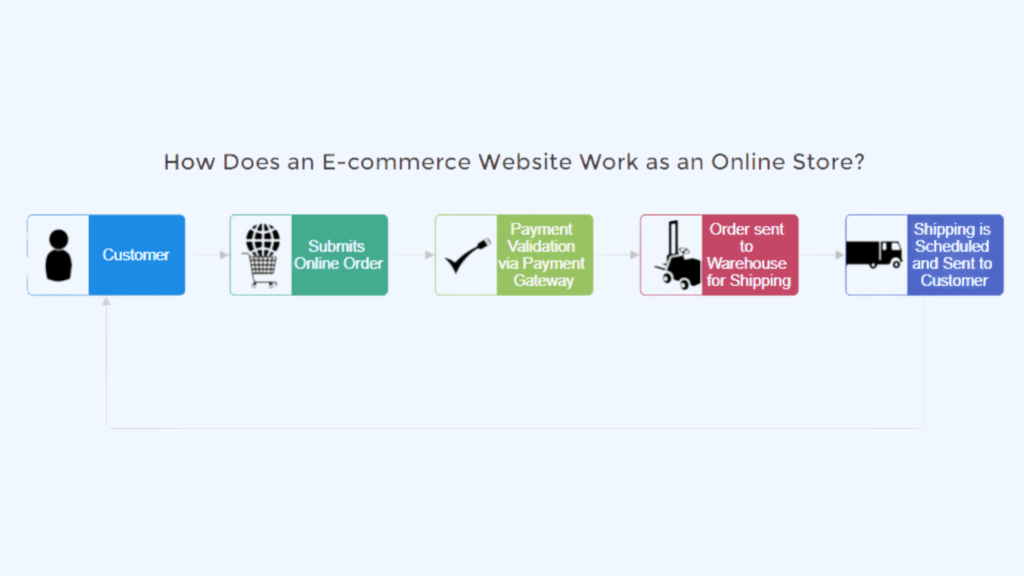
You visit a website. You browse products. You add items to a cart. You enter payment information. Days later, a package arrives at your door.
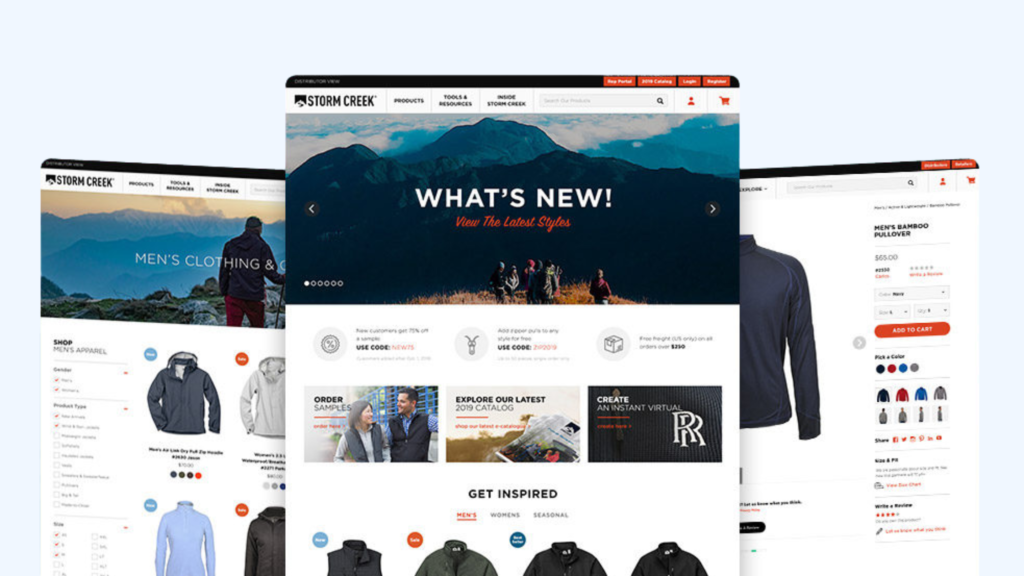
This sequence is so familiar, so seamlessly integrated into modern life, that we rarely stop to consider the complexity behind it. But when someone asks “what is an ecommerce website?” they’re not asking for a superficial description of online shopping. They’re asking about the architecture, the economics, and the strategic significance of the most transformative retail innovation in human history.
An ecommerce website is not merely a digital catalog. It is not simply a shopping cart with a payment gateway attached. It is a complete digital commerce system—a sophisticated integration of front-end user experience, back-end business logic, secure payment processing, inventory management, and customer relationship tools, all working in concert to enable the frictionless exchange of value between buyers and sellers across geographic boundaries and time zones .
The scale of this transformation is staggering. Global ecommerce sales are projected to reach $6.8 trillion by 2028 . By 2027, ecommerce is expected to account for 23% of total global retail sales . The Asia-Pacific region, led by China, dominates with over 50% of global ecommerce revenues, while the United States maintains its position as the second-largest market with sales exceeding $1.16 trillion .
This guide is your definitive resource. Drawing on verified definitions, real-world examples, and expert insights, we will answer the question “what is an ecommerce website?” with the depth and clarity it deserves. You will learn:
- The precise definition of an ecommerce website and how it differs from other types of websites
- The nine distinct types of ecommerce websites—from B2C marketplaces to C2C platforms—with real-world examples
- How ecommerce websites actually work: the seven core functions operating behind every transaction
- Essential features every professional ecommerce website must include
- Real-world examples: Amazon, Etsy, Warby Parker, and others illustrating different ecommerce models
- Step-by-step guidance on what to consider when building your own ecommerce website
- Common mistakes in ecommerce website design and how to avoid them
- Expert tips and best practices for 2026 and beyond
Whether you’re a student researching digital commerce, an entrepreneur planning your first online store, or an established business owner evaluating your current website, this guide provides the foundational understanding and actionable insights you need.
What Is an Ecommerce Website? A Precision Definition
An ecommerce website is a digital platform that facilitates commercial transactions between businesses and consumers (or other businesses) over the internet .
This concise definition contains three essential components:
- A digital platform: The website serves as the virtual storefront where products are displayed, described, and presented for sale.
- Commercial transactions: Money changes hands. A customer pays for goods or services through secure payment processing.
- Internet facilitation: The transaction occurs via web-based technology, distinguishing ecommerce from traditional brick-and-mortar retail, mail order, or telephone sales.
What Ecommerce Websites Are Not
Understanding what an ecommerce website is requires understanding what it is not:
| Type | Description | Why It’s Not Ecommerce |
|---|---|---|
| Brochure website | Displays company information, products, services, but no transaction capability | No commercial transaction occurs |
| Lead generation site | Collects contact information for follow-up | Revenue happens offline, not on the site |
| Content site with ads | Generates revenue through advertising impressions | Revenue comes from advertisers, not product sales |
| Affiliate site | Links to products sold elsewhere; takes commission | Transaction occurs on another website |
The critical distinction: An ecommerce website completes the entire transaction—from product discovery to payment capture—within its own ecosystem. The customer’s money is received by the business operating the website, not by a third party.
The Evolution of Ecommerce Websites
| Era | Characteristics | Examples |
|---|---|---|
| 1990s (Pioneer Era) | Basic HTML, simple catalogs, manual payment processing | Early Amazon (1995), first generation of online stores |
| 2000s (Platform Era) | Shopping cart software, payment gateways, templates | Rise of Magento, osCommerce, Yahoo Stores |
| 2010s (SaaS Era) | Hosted platforms, apps/plugins, mobile optimization | Shopify, BigCommerce, WooCommerce |
| 2020s (Commerce OS Era) | API-first, headless, omnichannel, AI integration | Shopify Plus, Commercetools, modern enterprise solutions |
The Nine Types of Ecommerce Websites
Ecommerce websites are categorized by who is selling to whom. Understanding these categories is essential for defining your business model and selecting the right platform .
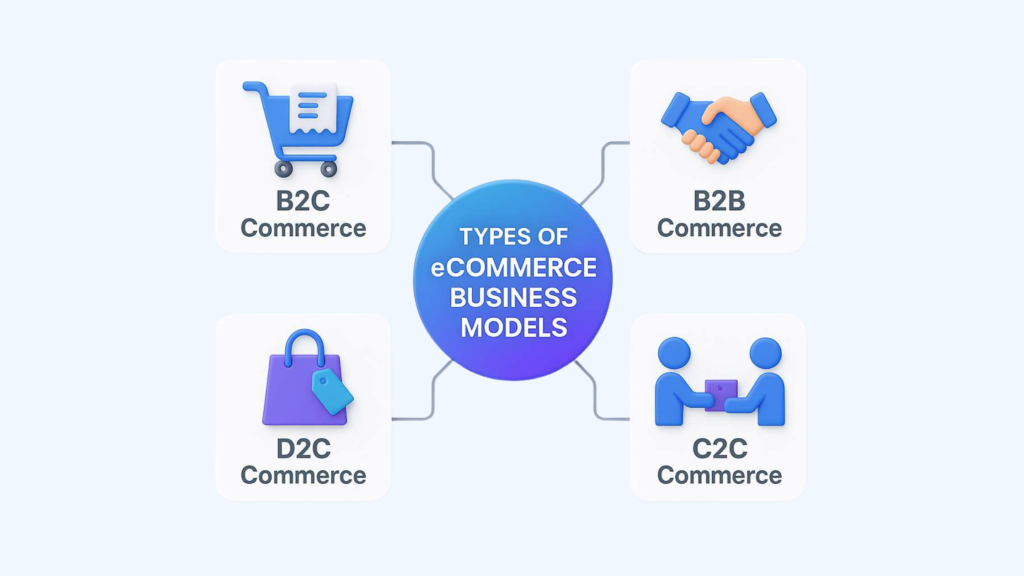
1. B2C (Business-to-Consumer) Ecommerce Websites
Definition: A business sells products or services directly to individual consumers.
Examples:
- Nike.com: The athletic apparel giant sells directly to consumers through its branded website
- Warby Parker: Online eyewear retailer that disrupted the optical industry
- Most Shopify stores: Thousands of direct-to-consumer brands operating their own storefronts
Characteristics: Smaller order values than B2B, higher marketing intensity, emphasis on brand and emotional connection. B2C represents the majority of public-facing ecommerce discourse, though it accounts for a smaller share of total transaction value than B2B .
2. B2B (Business-to-Business) Ecommerce Websites
Definition: A business sells products or services to other businesses.
Examples:
- Grainger.com: Industrial supplies for businesses
- Alibaba.com: Global wholesale marketplace connecting manufacturers with businesses
- McMaster-Carr: Industrial supply company with a robust B2B ecommerce platform
Characteristics: Larger order values, negotiated pricing, recurring contracts, complex fulfillment requirements. B2B ecommerce accounts for approximately 85% of total ecommerce transaction value .
Real-World Example: Graham & Brown, a 100+ year old UK wallcoverings company, launched its B2B ecommerce site in just 12 weeks. Within months, 90% of key accounts had adopted the digital channel, and inbound sales calls dropped dramatically as customers self-served on pricing and order status .
3. C2C (Consumer-to-Consumer) Ecommerce Websites
Definition: Individuals sell directly to other individuals, typically facilitated by a third-party platform.
Examples:
- eBay: The original online auction and marketplace
- Poshmark: Fashion resale platform
- Depop: Vintage and streetwear marketplace popular with younger demographics
- Facebook Marketplace: Social media integrated C2C platform
Characteristics: Platform acts as intermediary; seller is not necessarily a registered business; emphasis on trust and reputation systems .
4. C2B (Consumer-to-Business) Ecommerce Websites
Definition: Individuals offer products or services to businesses.
Examples:
- Upwork / Fiverr: Freelance platforms where individuals offer services to businesses
- iStock / Shutterstock: Stock photography where individuals license images to businesses
- Influencer marketing platforms: Creators offer promotional services to brands
Characteristics: The consumer is the supplier; the business is the buyer. Often operates through specialized platforms that match supply and demand .
5. B2G (Business-to-Government) Ecommerce Websites
Definition: Businesses sell to government agencies through specialized procurement portals.
Examples:
- Government e-procurement platforms: Where vendors bid on government contracts
- GSA Advantage!: U.S. General Services Administration online ordering system
Characteristics: Complex compliance requirements, extended payment cycles, high stability. B2G ecommerce remains less developed than other models due to regulatory fragmentation, but adoption is accelerating .
6. DTC (Direct-to-Consumer) Ecommerce Websites
Definition: A subset of B2C where the brand owns the entire customer relationship and sells exclusively through its own channels, bypassing wholesalers and marketplaces.
Examples:
- Casper: Mattress brand that pioneered DTC in its category
- Dollar Shave Club: Subscription razor brand
- Allbirds: Sustainable footwear brand
Characteristics: Full control over brand experience and customer data; responsibility for driving all traffic; emphasis on customer lifetime value over transaction margin .
7. Subscription Ecommerce Websites
Definition: Websites that facilitate recurring transactions for ongoing access to products or services.
Examples:
- Birchbox: Monthly beauty product samples
- Netflix: Streaming service subscription
- Dollar Shave Club: Recurring razor deliveries
- Meal kit services: Blue Apron, HelloFresh
Characteristics: Predictable revenue streams; emphasis on retention and churn prevention; different unit economics than one-time transactions .
8. Marketplace Ecommerce Websites
Definition: Platforms that connect multiple sellers with multiple buyers, typically taking a commission on each transaction.
Examples:
- Amazon: The world’s largest ecommerce marketplace
- eBay: Original online auction marketplace
- Etsy: Handmade and vintage goods marketplace
- Walmart Marketplace: Third-party seller platform integrated with Walmart’s inventory
Characteristics: Massive product selection, network effects, competition among sellers, platform controls customer relationship .
9. Social Commerce Websites
Definition: Transactions conducted entirely within social media platforms or via social media-integrated storefronts.
Examples:
- Instagram Checkout: Purchase products without leaving the app
- TikTok Shop: Native ecommerce within TikTok
- Facebook Shops: Brand storefronts on Facebook and Instagram
Characteristics: Discovery and transaction occur in the same environment; reduced friction; native to mobile behavior .
How Ecommerce Websites Work – The Core Functions
Behind every seamless customer experience is a complex integration of seven core functions. Understanding how ecommerce websites work means understanding these interconnected systems .
1. Digital Storefront (Front-End)
The customer-facing interface where products are displayed, described, and selected. This may be a branded website, a marketplace listing, a social media shop, or a mobile app.
Core components:
- Product catalog organization
- Search and filter functionality
- High-quality visual presentation
- Mobile responsiveness
- Brand-consistent design
The user experience imperative: The storefront must balance aesthetic appeal with functional efficiency. Navigation should be intuitive; product information should be comprehensive; checkout should be frictionless.
2. Product Catalog Management
The behind-the-scenes system that organizes product information and makes it searchable and displayable.
Core components:
- SKU management
- Product variants (size, color, style)
- Pricing rules
- Inventory status
- Product descriptions and specifications
- Image and video assets
Critical function: Accurate, comprehensive product data is essential for both customer experience and machine readability. AI shopping agents require structured, semantic product information to recommend your products .
3. Shopping Cart and Checkout
The mechanism by which customers indicate purchase intent and provide transaction data.
Core components:
- Persistent cart across sessions
- Guest checkout option (mandatory for conversion optimization)
- Address validation
- Tax calculation
- Shipping rate calculation
- Order summary
The abandonment challenge: Cart abandonment rates average 70–80%. An optimized checkout flow is essential for converting interest into revenue.
4. Payment Processing
The secure transmission and authorization of financial information.
Core components:
- Payment gateway integration
- Encryption of sensitive data
- Fraud detection
- Transaction authorization
- Payment confirmation
2026 trends: Digital wallets (Apple Pay, Google Pay) are now expected. Buy Now, Pay Later options (Klarna, Afterpay) increase average order value. The best payment experience is increasingly one the customer barely notices.
5. Order Management
The internal systems that track and process customer orders.
Core components:
- Order capture and confirmation
- Inventory allocation
- Fulfillment routing
- Status tracking
- Customer communication
- Returns processing
Integration requirement: Order management must connect with inventory systems, fulfillment operations, and customer communication tools.
6. Customer Relationship Management
The systems and processes for managing post-purchase relationships.
Core components:
- Customer account portals
- Order history
- Saved payment methods
- Communication preferences
- Loyalty program integration
The retention imperative: Acquiring a new customer costs 5–7 times more than retaining an existing one. Post-purchase systems are essential for driving repeat business.
7. Analytics and Reporting
The measurement infrastructure that enables optimization.
Core components:
- Traffic analysis
- Conversion tracking
- Sales reporting by product, channel, customer segment
- Customer acquisition cost
- Customer lifetime value
- Inventory turnover
The optimization loop: Data informs decisions. Decisions improve performance. Performance generates more data.
Fundamental insight: An ecommerce website is not defined by the presence of a storefront. It is defined by the integration and operation of these seven functions. A beautiful website with no inventory management system is not ecommerce—it is a brochure.
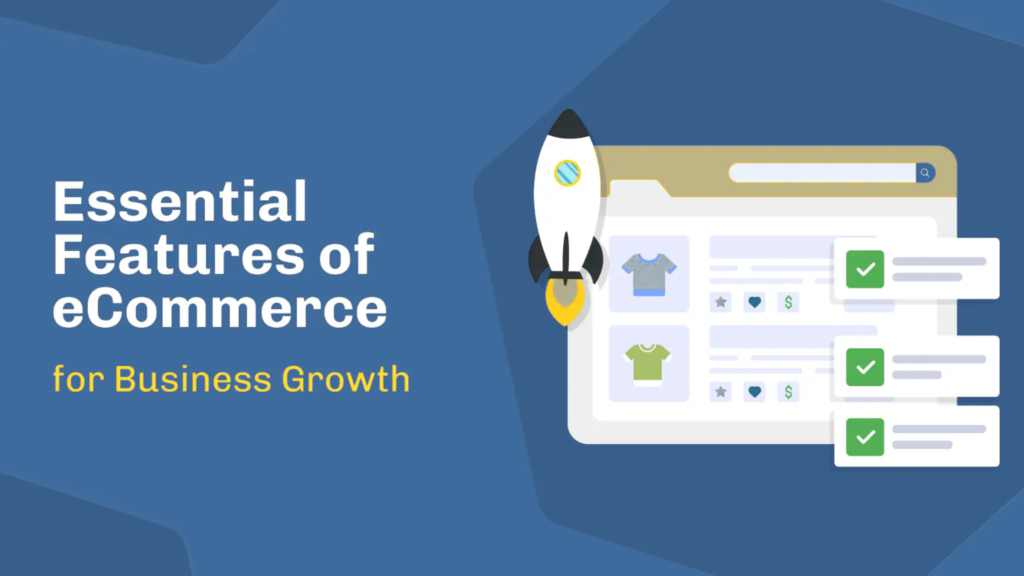
Essential Features of Professional Ecommerce Websites
User Experience Features
| Feature | Why It Matters |
|---|---|
| Intuitive navigation | Customers find what they’re looking for quickly |
| Mobile responsiveness | Over half of traffic is mobile; poor mobile experience loses customers |
| Fast loading speed | Every second of delay reduces conversions |
| High-quality product images | Multiple angles, zoom capability, accurate color representation |
| Clear calls-to-action | Customers know exactly what to do next |
| Guest checkout | Don’t force account creation; it increases abandonment |
Trust and Security Features
| Feature | Why It Matters |
|---|---|
| SSL/HTTPS | Encrypts customer data; essential for trust and SEO |
| PCI DSS compliance | Secure payment processing; legally required |
| Clear privacy policy | Transparency about data usage; legal requirement |
| Secure payment icons | Visual reassurance that transactions are safe |
| Customer reviews | Social proof builds trust |
| Clear return policy | Reduces purchase hesitation |
Conversion Optimization Features
| Feature | Why It Matters |
|---|---|
| Abandoned cart recovery | Recovers 10–15% of lost sales |
| Product recommendations | Increases average order value |
| Upsells and cross-sells | Increases average order value |
| Exit-intent popups | Captures leaving visitors |
| Multiple payment options | Accommodates customer preferences |
| Live chat | Answers questions in real time |
Operational Features
| Feature | Why It Matters |
|---|---|
| Inventory management | Prevents overselling; enables accurate stock levels |
| Order management | Tracks fulfillment; enables customer communication |
| Shipping integration | Real-time rates; label printing |
| Tax calculation | Accurate collection; compliance |
| Returns management | Streamlines reverse logistics |
| Reporting and analytics | Measures performance; informs decisions |
Real-World Ecommerce Website Examples
Amazon – The Marketplace Giant
Type: B2C Marketplace
What makes it work:
- Massive product selection (hundreds of millions of SKUs)
- Sophisticated search and recommendation algorithms
- Prime membership driving loyalty and frequency
- One-click checkout minimizing friction
- Customer reviews providing social proof
- Fulfillment by Amazon enabling third-party sellers
Key lesson: Network effects create competitive moats. More sellers attract more buyers; more buyers attract more sellers. The platform becomes more valuable as it grows.
Etsy – The Handmade Marketplace
Type: C2C/B2C Hybrid Marketplace
What makes it work:
- Strong brand identity focused on handmade, vintage, and unique items
- Community of makers and buyers
- Personalization and discovery tools
- Seller tools for managing shops
- Trust and safety systems
Key lesson: Niche focus can compete with generalists. Etsy carved out a distinct identity that Amazon cannot replicate.
Warby Parker – The DTC Pioneer
Type: DTC (Direct-to-Consumer)
What makes it work:
- Home try-on program overcoming the “can’t try before buying” barrier
- Strong brand narrative (affordable, stylish, socially conscious)
- Seamless online experience
- Integrated physical retail (omnichannel)
- Virtual try-on technology
Key lesson: Address the inherent limitations of online shopping creatively. Warby Parker’s home try-on program directly addressed the primary objection to buying glasses online.
Graham & Brown – B2B Digital Transformation
Type: B2B Ecommerce
What makes it work:
- Customer-specific pricing for wholesale accounts
- Batch number tracking for quality assurance
- Quick-order forms for high-volume buyers
- Self-service portal reducing inbound sales calls
Key lesson: B2B buyers expect B2C experiences. Graham & Brown’s B2B site delivers consumer-grade usability while handling complex B2B requirements.
Gymshark – Community-Driven DTC
Type: DTC (Direct-to-Consumer)
What makes it work:
- Strong community building through social media
- Influencer partnerships and athlete ambassadors
- Limited drops creating urgency
- Mobile-first design
- Seamless checkout experience
Key lesson: Brand community drives loyalty and repeat purchases. Gymshark’s success is built as much on community as on product.
How to Build an Ecommerce Website – Key Considerations

Step 1 – Define Your Business Model
Before you build, answer:
- Who are your customers? (B2C, B2B, both?)
- What are you selling? (Physical products, digital goods, services, subscriptions?)
- How will you source products? (Manufacturing, wholesale, dropshipping?)
- What is your unique value proposition?
Your business model determines everything else—platform selection, feature requirements, marketing strategy.
Step 2 – Choose Your Ecommerce Platform
Based on your business model, technical resources, and budget:
| Business Type | Recommended Platform |
|---|---|
| Small B2C, first-time founder | Shopify, Wix, Squarespace |
| Growing B2C/B2B hybrid | BigCommerce |
| B2B with complex requirements | BigCommerce, Adobe Commerce |
| Enterprise with Salesforce CRM | Salesforce Commerce Cloud |
| WordPress site adding commerce | WooCommerce |
| Unique customer experience needed | Headless/composable |
Selection criteria:
- Business model fit (B2C, B2B, hybrid)
- Total cost of ownership (24-month model)
- Integration requirements (ERP, PIM, etc.)
- Scalability
- Mobile performance
- SEO capabilities
Step 3 – Design for Conversion
Your website design must prioritize conversion, not just aesthetics:
- Mobile-first: Design for mobile, then adapt for desktop
- Clear navigation: Customers find products in 3 clicks or fewer
- High-quality images: Multiple angles, zoom, video where appropriate
- Compelling copy: Benefits-focused, not just features
- Trust signals: Reviews, security badges, clear policies
- Streamlined checkout: Guest option, minimal fields, progress indicator
Step 4 – Configure Essential Features
Ensure your website includes:
- Product catalog with variants and attributes
- Shopping cart with persistent functionality
- Secure payment processing (multiple gateways)
- Tax calculation (automated for multi-state/country)
- Shipping integration (real-time rates, label printing)
- Order management and tracking
- Customer accounts (optional but valuable)
- Analytics and reporting
Step 5 – Test Thoroughly Before Launch
Pre-launch checklist:
- All links work correctly
- Checkout flow functions on all devices
- Payment processing works (test transactions)
- Tax calculated correctly
- Email notifications send
- Inventory updates accurately
- Analytics tracking installed and verified
- SSL certificate active
- Site loads quickly (test with GTmetrix, Google PageSpeed)
- Mobile experience smooth
Common Ecommerce Website Mistakes (And How to Avoid Them)
Mistake 1 – Confusing the Website with the Business
The error: Believing that a beautiful website equals a successful ecommerce business.
The consequence: You invest in design while neglecting operations, marketing, and customer experience. The website looks great but generates no revenue.
Avoidance: Remember: your website is an interface. Your business is the integrated system of sourcing, marketing, fulfillment, and customer service. Invest proportionally.
Mistake 2 – Launching Without an Acquisition Plan
The error: “If I build it, they will come” remains the most expensive myth in digital commerce.
The consequence: A technically perfect website with zero visitors, zero sales, and zero revenue.
Avoidance: Your launch date and your first marketing campaign date must be identical. Budget for customer acquisition before you build.
Mistake 3 – Ignoring Mobile Experience
The error: Designing for desktop and tolerating mobile as an afterthought.
The consequence: With mobile accounting for the majority of traffic, you’re alienating most potential customers.
Avoidance: Design mobile-first. Test on actual devices. Ensure checkout works on small screens.
Mistake 4 – Forcing Account Creation
The error: Requiring customers to create accounts before checking out.
The consequence: Cart abandonment spikes. Customers who just want to buy once are frustrated.
Avoidance: Always offer guest checkout. Invite account creation after purchase.
Mistake 5 – Hidden Costs at Checkout
The error: Surprising customers with shipping costs, taxes, or fees at the final step.
The consequence: Cart abandonment. Customers feel misled and lose trust.
Avoidance: Be transparent about all costs early. Display shipping estimates on product pages and cart.
Mistake 6 – Poor Product Information
The error: Insufficient product descriptions, low-quality images, missing specifications.
The consequence: Customers cannot evaluate the product sufficiently to commit to purchase. Returns increase when products arrive different from expectations.
Avoidance: Provide multiple high-quality images, detailed specifications, size guides, and customer reviews.
Mistake 7 – Neglecting SEO Foundations
The error: Launching without optimizing for search engines—custom titles, meta descriptions, URL structures.
The consequence: Your products are invisible to organic search, forcing total dependence on paid traffic.
Avoidance: Implement SEO best practices during development, not after launch.
Expert Tips and Best Practices for 2026
1. Mobile-First Is Non-Negotiable
Over half of ecommerce traffic originates on mobile devices. If your checkout requires pinch-to-zoom or contains fields smaller than a fingertip, you’re losing 6 out of 10 potential sales before they reach the cart . Design for mobile first; desktop will naturally follow.
2. Speed Matters More Than Ever
Core Web Vitals are ranking factors. Every second of delay reduces conversions. Compress images, minimize code, use a CDN, and test regularly with Google PageSpeed Insights.
3. Trust Is Your Most Valuable Currency
Display trust signals prominently: SSL certificate, secure payment icons, clear return policy, customer reviews, and contact information. Seventy-three percent of consumers will stop purchasing from a brand that suffers a data breach .
4. Personalization Drives Conversion
Use customer data to deliver personalized experiences: product recommendations based on browsing history, personalized email follow-ups, dynamic content based on location or behavior.
5. Design for Machine Customers
By 2026, a significant portion of ecommerce traffic will arrive via AI shopping agents. Structure your product data for machine readability. Use schema markup, complete product attributes, and semantic HTML.
6. Optimize for Search from Day One
Customize title tags, meta descriptions, and URLs. Create unique product descriptions (not manufacturer defaults). Build a logical site structure with internal linking. Submit XML sitemaps to search engines.
7. Test Everything, Always
A/B test headlines, images, button colors, offers, and checkout flows. The best-performing websites are those that never stop experimenting.
8. Simplify Checkout
The fewer fields, the higher the conversion. Auto-fill addresses when possible. Offer digital wallets. Show progress indicators. Eliminate distractions.
9. Build for Retention, Not Just Acquisition
One-time customers are expensive to acquire and generate negative ROI in many cases. Build loyalty programs, implement post-purchase email flows, and create experiences that bring customers back.
10. Stay Compliant
GDPR, CCPA, and emerging privacy laws impose requirements for cookie consent, data collection, and user rights. Implement compliance from day one; retrofitting is expensive.
Frequently Asked Questions (FAQ)
1. What is an ecommerce website?
An ecommerce website is a digital platform that facilitates commercial transactions between businesses and consumers (or other businesses) over the internet. It enables customers to browse products, add items to a cart, and complete purchases through secure payment processing .
2. What are the different types of ecommerce websites?
The main types are B2C (Business-to-Consumer), B2B (Business-to-Business), C2C (Consumer-to-Consumer), C2B (Consumer-to-Business), DTC (Direct-to-Consumer), subscription-based, marketplace, and social commerce .
3. How do ecommerce websites work?
Ecommerce websites integrate seven core functions: digital storefront (front-end), product catalog management, shopping cart and checkout, payment processing, order management, customer relationship management, and analytics/reporting .
4. What is the difference between an ecommerce website and a regular website?
A regular website (brochure site) displays information but does not facilitate transactions. An ecommerce website includes the technical infrastructure for product selection, payment processing, order management, and customer communication—enabling complete commercial transactions .
5. Do I need a business license to start an ecommerce website?
In most jurisdictions, yes. You should operate as a registered business entity (LLC, sole proprietorship, etc.) and obtain any required licenses or permits. This is essential for tax compliance, liability protection, and merchant account approval .
6. How much does it cost to build an ecommerce website?
Costs range from $29/month for basic SaaS platforms (DIY) to $5,000–$50,000+ for custom development. Total cost depends on platform selection, design complexity, feature requirements, and whether you build internally or hire professionals .
7. What are the essential features of an ecommerce website?
Essential features include: intuitive navigation, mobile responsiveness, fast loading speed, high-quality product images, clear calls-to-action, guest checkout, SSL security, PCI compliance, customer reviews, abandoned cart recovery, and analytics .
8. What is the best platform for an ecommerce website?
There is no universal “best” platform. The right choice depends on your business model, technical resources, and budget. Shopify is excellent for ease of use; BigCommerce for B2B and zero transaction fees; Adobe Commerce for complex, customizable enterprise solutions .
9. Can I build an ecommerce website myself?
Yes. SaaS platforms like Shopify, BigCommerce, and Wix allow non-technical users to build functional ecommerce websites using themes and apps. However, custom functionality or complex integrations may require professional development .
10. What is mobile-first design for ecommerce?
Mobile-first design prioritizes the mobile user experience over desktop. Design, development, and performance optimization begin with the smallest screen and largest constraints, then progressively enhance for larger viewports .
11. How do I get traffic to my ecommerce website?
Traffic sources include: organic search (SEO), paid advertising (Google Ads, Meta Ads, TikTok Ads), social media organic content, email marketing, influencer partnerships, content marketing, and referrals. Most new sites require paid traffic initially .
12. What is PCI compliance and do I need it?
PCI DSS (Payment Card Industry Data Security Standard) is mandatory for any business accepting credit cards. SaaS platforms include PCI compliance in their scope; custom and open-source implementations require you to achieve and maintain it independently .
13. What is cart abandonment and how do I reduce it?
Cart abandonment occurs when customers add items to cart but leave without purchasing. Average rates are 70–80%. Reduce it by: offering guest checkout, being transparent about costs, providing multiple payment options, sending abandoned cart emails, and optimizing checkout flow .
14. What is the difference between B2C and B2B ecommerce websites?
B2C websites focus on direct-to-consumer sales with emphasis on brand, emotion, and individual customer experience. B2B websites handle larger order values, negotiated pricing, recurring contracts, quote-to-order workflows, and integration with ERP systems .
15. What is a marketplace ecommerce website?
A marketplace connects multiple sellers with multiple buyers, typically taking a commission on transactions. Examples include Amazon, eBay, Etsy, and Walmart Marketplace. The platform owns the customer relationship; sellers compete for sales .
16. What is DTC ecommerce?
DTC (Direct-to-Consumer) ecommerce is a subset of B2C where brands sell exclusively through their own channels, bypassing wholesalers and marketplaces. The brand owns the entire customer relationship and controls the brand experience .
17. How important is SEO for ecommerce websites?
Critical. Organic search is often the largest source of traffic for established ecommerce sites. SEO drives qualified, high-intent traffic without direct cost per click. Neglecting SEO means paying for traffic that competitors get for free .
18. What is the future of ecommerce websites?
The future includes: AI-driven personalization, voice commerce, augmented reality try-on experiences, agentic commerce (AI shopping agents purchasing on behalf of consumers), and unified commerce (seamless integration across online and offline channels) .
19. Do I need a mobile app if I have an ecommerce website?
Not necessarily. Mobile-optimized websites convert well for most businesses. Native apps are justified for high-repeat-purchase categories, loyalty-driven brands, or businesses where push notifications drive significant engagement .
20. What is the most common mistake when building an ecommerce website?
The most common and costly mistake is launching without a customer acquisition plan. A beautiful website with no traffic generates no revenue. Build your marketing plan alongside your website, not after .
Conclusion
An ecommerce website is not a project with an end date. It is not something you “get done” so you can move on to marketing. It is the digital storefront of your business—the primary interface between your brand and your customers.
The organizations that succeed with ecommerce websites share common practices:
They understand the distinction between storefront and system. They invest as heavily in inventory management, order processing, and customer service as they do in design and photography.
They prioritize mobile experience. They know that over half their customers will arrive on small screens and design accordingly.
They build for trust. They display clear policies, secure payment options, and authentic customer reviews. They understand that trust is the currency of online commerce.
They optimize continuously. They test, measure, learn, and iterate. They don’t guess—they know.
They think beyond the transaction. They build loyalty programs, implement post-purchase engagement, and create experiences that bring customers back.
The path forward:
- Define your business model before you build. Know who you’re selling to, what you’re selling, and how you’ll source products.
- Choose the right platform for your needs. Match architecture to your resources and requirements.
- Design for conversion, not awards. Prioritize mobile experience, clear navigation, and frictionless checkout.
- Build trust through transparency. Display policies prominently and protect customer data.
- Plan for traffic before launch. Your marketing strategy and your website should launch simultaneously.
- Measure what matters. Track conversion rate, average order value, customer acquisition cost, and customer lifetime value.
- Never stop optimizing. Test everything. Learn from data. Iterate continuously.
The global ecommerce market will exceed $6.8 trillion by 2028 . Your share of that market will be determined, in large part, by the quality of your ecommerce website and the discipline with which you operate it.