Table of Contents
Introduction
You have a product to sell. You have customers waiting. You have a vision for your brand.
But before any of that becomes reality, you face a decision that will shape your business for years to come: what ecommerce platform should you choose?
This is not a trivial question. Your ecommerce platform is not just a website builder. It is the operating system for your entire digital business. It determines how you manage products, process payments, handle inventory, integrate with suppliers, and deliver customer experiences. The wrong choice can cost you months of development time, tens of thousands of dollars, and—ultimately—your competitive position.
The stakes are quantified. The global ecommerce software market is projected to grow from $9.08 billion in 2025 to $16.5 billion by 2030 . Businesses that choose wisely scale efficiently; those that choose poorly find themselves in expensive, disruptive replatforming projects within 24 months.
This guide exists to ensure you join the former group, not the latter.
Drawing on verified market data, real-world case studies, and the collective experience of thousands of successful ecommerce operators, this comprehensive resource will answer the question “what ecommerce platform?” with the depth and clarity it deserves. You will learn:
- The four architectural categories of ecommerce platforms—SaaS, headless/composable, open-source, and enterprise—and which one matches your business stage
- A side-by-side comparison of leading platforms in 2026: Shopify, BigCommerce, Adobe Commerce, Salesforce Commerce Cloud, WooCommerce, and emerging composable solutions
- The 15 essential features every platform must provide, organized by business function
- Real-world use cases: how Yara Electronics scaled to 1,000+ monthly visitors, how Graham & Brown converted 90% of B2B accounts in 12 weeks, and how Broulim’s grew digital customers 40% through unified commerce
- A step-by-step platform selection methodology used by enterprise retailers and high-growth DTC brands
- The five most expensive platform selection mistakes and how to avoid them
- Expert tips on total cost of ownership modeling, integration requirements, and future-proofing your technology stack
Whether you are launching your first store or evaluating a replatform for an established brand, this guide provides the clarity and actionable frameworks you need to answer definitively: what ecommerce platform is right for you?
What Is an Ecommerce Platform? A Precision Definition

An ecommerce platform is a software application that enables businesses to manage an online store, including product catalog presentation, shopping cart functionality, payment processing, order management, and customer relationship management .
Modern ecommerce platforms have evolved far beyond their origins as simple “shopping cart” software. Today’s platforms are integrated commerce operating systems that orchestrate inventory, personalize experiences, sync online and offline channels, and adapt in real-time to customer behavior .
Core Functions of an Ecommerce Platform
| Function | Description |
|---|---|
| Catalog management | Organize and display products with attributes, variants, images, and pricing |
| Shopping cart | Capture customer selections, calculate totals, manage checkout flow |
| Payment processing | Integrate with gateways, handle transaction security, manage refunds |
| Order management | Track orders from placement through fulfillment, manage status updates |
| Inventory management | Track stock levels across locations, trigger reorders, prevent overselling |
| Customer management | Store customer data, order history, preferences, communication logs |
| Marketing tools | SEO optimization, email/SMS integration, promotions, discounts |
| Analytics and reporting | Sales performance, customer behavior, conversion metrics |
| Integration capability | Connect with ERP, PIM, WMS, CRM, and third-party applications |
The Evolution: From Shopping Cart to Commerce Operating System
The term “shopping cart software” emerged in the 1990s when the primary challenge was simply enabling online transactions. Today’s ecommerce software must address a vastly more complex set of requirements:
1995–2005: Shopping Cart Era
- Primary function: Enable basic online transactions
- Key players: Early versions of Magento, osCommerce, Yahoo Stores
- Limitations: Siloed, no integration, limited scalability
2005–2015: Platform Era
- Primary function: Manage entire online store operations
- Key players: Shopify, BigCommerce, Magento (acquired by Adobe)
- Evolution: Templates, apps/plugins, hosted solutions
2015–2025: Commerce Operating System Era
- Primary function: Orchestrate multi-channel commerce operations
- Key players: Shopify Plus, BigCommerce Enterprise, Adobe Commerce, Salesforce Commerce Cloud
- Evolution: API-first architecture, headless/composable, ecosystem integration
2025+: Agentic Commerce Era
- Primary function: Enable AI-driven, autonomous commerce transactions
- Key trend: Integration with AI shopping agents, machine-readable product data, predictive personalization
Critical insight: The platform you choose today must not only support your current operations but also position you for the agentic commerce future, where AI shopping assistants will discover, evaluate, and purchase products on behalf of consumers .
The Four Architectural Categories of Ecommerce Platforms
When asking “what ecommerce platform should I choose?” your first decision is not which vendor to select. It is which architecture category best suits your business. This decision determines your speed, flexibility, cost structure, and internal resource requirements for the next 3–7 years .
1. SaaS (Software-as-a-Service) Ecommerce Platforms
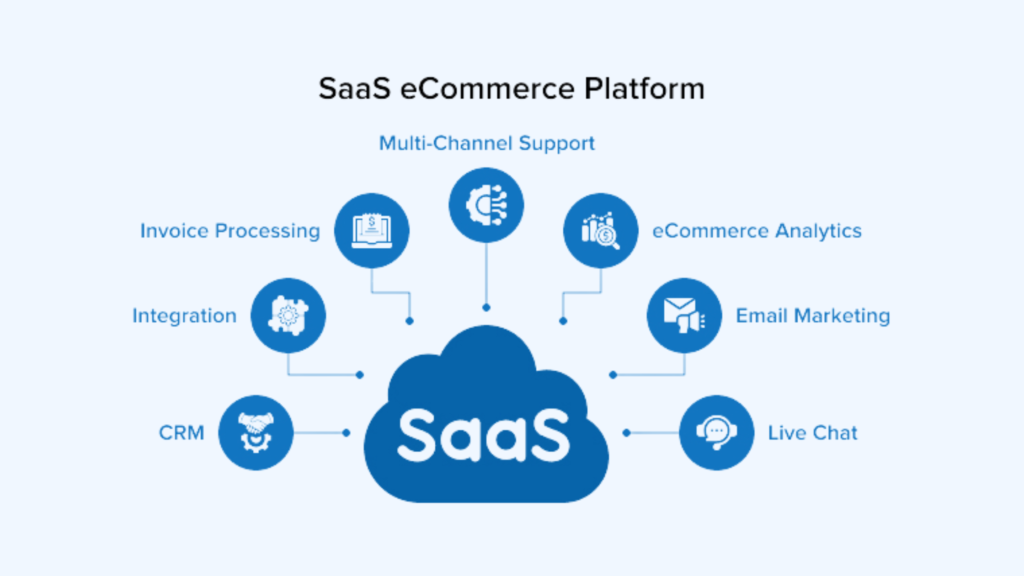
How it works: The platform provider hosts everything. They handle security patches, PCI compliance, server uptime, and software updates. You manage the storefront, products, and marketing.
Who it fits: Brands that prioritize speed-to-market, have lean technical teams, and need predictable operational costs.
Leading platforms: Shopify, BigCommerce, Wix, Squarespace
| Pros | Cons |
|---|---|
| Fastest launch timeline (as quick as 8–12 weeks) | Some platforms restrict code-level access |
| No hosting maintenance, security audits, version upgrades | Transaction fees can apply if bypassing native payment gateway |
| Total Cost of Ownership transparent and predictable | Less flexibility for highly customized experiences |
Real-World Example: Graham & Brown, a 100+ year old UK wallcoverings company, launched its B2B ecommerce site on BigCommerce in just 12 weeks. Within months, 90% of key accounts had adopted the digital channel, and inbound sales calls dropped dramatically as customers self-served on pricing and order status .
2. Headless and Composable Commerce
How it works: You decouple the front-end presentation layer from the back-end commerce engine. You assemble best-in-class components: a CMS from Contentful, a search tool from Algolia, a cart engine from Shopify or BigCommerce, and a payment processor from Stripe—all connected via APIs.
Who it fits: Mid-market and enterprise brands with unique customer experiences that cannot be achieved with templated themes. Brands already operating headless content strategies.
Leading platforms (commerce engines): Shopify (headless), BigCommerce (headless), Elastic Path, Commercetools
| Pros | Cons |
|---|---|
| Unlimited design and UX flexibility | Higher initial development investment |
| Components can be upgraded independently | Requires product management discipline |
| Future-proof; no monolithic replatforming every 5 years | More complex vendor management |
Context: Gartner introduced composable commerce in 2020, and it is now the dominant architecture for enterprise digital transformation .
3. Open-Source Ecommerce Platforms
How it works: You download the source code, install it on your own servers (or cloud VMs), and assume full responsibility for security, performance, and updates.
Who it fits: Large enterprises with dedicated development teams; ultra-high volume operations with niche compliance requirements.
Leading platforms: Adobe Commerce (Magento), WooCommerce, PrestaShop, OroCommerce
| Pros | Cons |
|---|---|
| Complete control over code and functionality | High total cost of ownership (development + maintenance) |
| No licensing fees (but significant implementation costs) | Security and PCI compliance are your responsibility |
| Unlimited customization potential | Version upgrades require development resources |
The Hidden Cost Reality: Open-source appears “free” or low-cost initially. In reality, Total Cost of Ownership often exceeds enterprise SaaS when you factor in development salaries, plugin licensing, server infrastructure, and security maintenance .
4. Enterprise Ecommerce Platforms
How it works: Comprehensive, enterprise-grade solutions designed for large, complex organizations with high transaction volumes, multiple brands, and international operations.
Who it fits: Global enterprises, Fortune 500 retailers, businesses with complex B2B requirements.
Leading platforms: Salesforce Commerce Cloud, SAP Hybris, Oracle Commerce
| Pros | Cons |
|---|---|
| Enterprise-grade scalability and security | High cost (implementation in millions) |
| Deep integration with enterprise ecosystems | Long implementation timelines (12–24 months) |
| Comprehensive B2B and B2C capabilities | Requires significant internal resources |
The 15 Essential Features Every Ecommerce Platform Must Provide
Catalog and Product Management
1. Product catalog management
- Support for unlimited SKUs
- Variant management (size, color, style)
- Digital product support
- Bundling and kits
2. Category and navigation
- Flexible category structures
- Faceted search/filtering
- SEO-friendly URLs
- Breadcrumb navigation
3. Product imagery and media
- Multiple images per product
- Zoom functionality
- Video embedding
- 360-degree view support
Shopping Cart and Checkout
4. Shopping cart functionality
- Persistent cart across sessions
- Saved carts/wish lists
- Guest checkout option
- Cart abandonment recovery
5. Checkout optimization
- One-page checkout
- Multiple payment options
- Address validation
- Order review before submission
6. Payment processing
- Multiple gateway integration
- Digital wallets (Apple Pay, Google Pay)
- Buy Now, Pay Later (Klarna, Afterpay)
- Subscription/recurring billing
Order and Customer Management
7. Order management
- Order capture and processing
- Fulfillment workflow
- Split shipments
- Returns and exchanges
8. Customer management
- Customer account portals
- Order history
- Saved payment methods
- Loyalty program integration
9. Inventory management
- Real-time stock tracking
- Low stock alerts
- Multi-warehouse support
- Inventory synchronization
Marketing and SEO
10. SEO capabilities
- Customizable title tags and meta descriptions
- SEO-friendly URL structures
- Canonical tags
- XML sitemap generation
11. Marketing tools
- Promotions and discounts
- Coupon codes
- Gift cards
- Abandoned cart emails
12. Analytics and reporting
- Sales reports
- Customer behavior analytics
- Conversion tracking
- Custom dashboarding
Technical and Integration
13. Mobile responsiveness
- Mobile-optimized themes
- Responsive design
- Mobile-specific checkout
14. API and integration
- REST/GraphQL APIs
- Webhooks
- Third-party app ecosystem
- ERP/PIM/WMS integration
15. Security and compliance
- SSL/HTTPS
- PCI DSS compliance
- GDPR/CCPA tools
- Regular security updates
Leading Ecommerce Platforms Compared (2026)
| Platform | Architecture | Best For | Key Differentiator |
|---|---|---|---|
| Shopify | SaaS | SMB to Mid-Market; DTC | App ecosystem; ease of use |
| Shopify Plus | SaaS/Composable | Enterprise DTC | Scalability; headless capability |
| BigCommerce | SaaS/Composable | B2B, B2C, Hybrid; Growth-stage | Zero transaction fees; native B2B; open APIs |
| Adobe Commerce | Open-source/Cloud | Enterprise; Complex catalog | Highly customizable; strong B2B native logic |
| Salesforce Commerce Cloud | SaaS | Enterprise CRM-first | Tight Salesforce integration |
| WooCommerce | Open-source | WordPress users; Micro-brands | Low barrier; massive plugin library |
| Wix/Squarespace | SaaS | Micro-business; Service providers | Design-led templates |
| Commercetools | Composable | Enterprise; Composable-first | True MACH architecture |
| BigCommerce Enterprise | SaaS/Composable | High-growth B2B/B2C | Enterprise features at growth-stage pricing |
Platform Selection Decision Framework
Choose Shopify when:
- You need to launch in under 8 weeks
- Your catalog is under 10,000 SKUs
- Your B2B requirements are basic or non-existent
- You prefer an extensive app ecosystem over native functionality
- You value ease of use above all
Choose BigCommerce when:
- You need zero transaction fees on external gateways
- You have B2B requirements (customer-specific pricing, quotes, quick order forms)
- You anticipate headless/composable expansion
- You want to avoid platform lock-in
- You need enterprise features without enterprise pricing
Choose Adobe Commerce (Magento) when:
- You have a dedicated development team
- Your catalog exceeds 100,000 SKUs with complex attributes
- You need highly customized B2B workflows
- You accept higher total cost of ownership for unlimited flexibility
Choose Salesforce Commerce Cloud when:
- You are deeply invested in the Salesforce ecosystem
- You need enterprise-grade CRM integration
- You have budget for enterprise implementation and maintenance
- Unified customer data across sales and service is critical
Choose WooCommerce when:
- You are already on WordPress
- Your catalog is under 5,000 SKUs
- You have WordPress development resources
- You prefer open-source flexibility with lower initial cost
Choose composable (Commercetools, Elastic Path) when:
- Your customer experience requires unique front-end interactions
- You have internal engineering capacity
- You accept 4–8 month development timelines
- You are prepared for ongoing component management
Real-World Use Cases and Case Studies
Case Study 1 – Yara Electronics: Scaling with Bagisto
The Business: Yara Electronics, an India-based brand selling innovative TVs and home appliances, including interactive displays and smart refrigerators .
The Challenge: Yara struggled to scale its online presence without a platform capable of organizing its complex product catalog, managing orders efficiently, and delivering a seamless shopping experience across devices.
The Solution: Yara launched its online store on Bagisto, an open-source ecommerce platform built on Laravel. The platform’s architecture allowed for robust product attribute management and cross-device compatibility.
The Results:
- 1,000+ monthly visitors
- Streamlined inventory and catalog management
- Enhanced brand presence across India
- Mobile-friendly shopping experience driving conversions
Key Lesson: For businesses with complex, attribute-rich catalogs, ecommerce software must excel at data architecture. The product information model determines success.
Case Study 2 – Graham & Brown: B2B Digital Transformation
The Business: Graham & Brown, a 100+ year old UK wallcoverings company, needed to digitize its wholesale operations .
The Challenge: B2B buyers expected consumer-grade digital experiences, including customer-specific pricing, batch number tracking (critical for wallpaper dye lots), and quick-order forms for high-volume purchasing.
The Solution: Using BigCommerce’s enterprise SaaS platform with native B2B functionality, the development team launched the site in just 12 weeks. Critical features included customer-specific price lists, batch number tracking, and quick-order entry.
The Results:
- 90% of key accounts adopted the digital channel within weeks
- Inbound sales calls dropped as customers self-served
- Foundation for future B2B ecommerce expansion
Key Lesson: B2B ecommerce requires specialized platform capabilities. Forcing B2C tools to behave like B2B systems creates technical debt and user friction.
Case Study 3 – Broulim’s: Unified Commerce for Grocery
The Business: Broulim’s, a 12-store regional grocer, operated three disconnected systems: a website, a loyalty app, and an ecommerce platform .
The Challenge: Fragmented data created inconsistent customer experiences and operational inefficiency. They needed unified commerce.
The Solution: Broulim’s consolidated onto Instacart’s Storefront Pro white-label platform, enabling single sign-on, unified loyalty, real-time inventory across 12 locations, and curbside pickup orchestration.
The Results:
- 14% GMV growth year-over-year
- 40% increase in digital customers
- 4.7/5 customer satisfaction score
Key Lesson: For multi-channel retailers, ecommerce software is integration engineering. Value lies in synchronizing inventory, customer identity, and fulfillment across channels.
Case Study 4 – Stanfield: Platform Migration Success
The Business: Stanfield, a workwear brand, operated on an outdated Magento platform that limited growth .
The Challenge: The existing platform was complex, time-consuming, and constrained marketing capabilities.
The Solution: Migration to Shopify Plus with expert implementation by P3 Media, including replatforming, design refresh, and marketing strategy.
The Results:
- 168% increase in conversion rate
- 20% increase in average order value
- 59% increase in total transactions
Key Lesson: Platform migration, when executed strategically, can deliver step-change improvements in performance.
Step-by-Step Guide – How to Choose an Ecommerce Platform
Phase 1 – Discovery and Requirements Definition
Do not start by comparing Shopify vs. BigCommerce vs. Adobe Commerce.
Do start by answering these questions:
Business requirements:
- What is your business model? (B2C, B2B, DTC, hybrid, subscription?)
- How many SKUs do you have today? In 3 years?
- What is your average order value? Order volume?
- Do you sell internationally? Multi-currency? Multi-language?
Technical requirements:
- What systems must integrate with your ecommerce software? (ERP, PIM, WMS, CRM, marketing automation?)
- Do you have internal development resources?
- What is your budget for ongoing maintenance and development?
Customer experience requirements:
- What makes your customer experience unique?
- Do you need custom front-end functionality?
- What are your mobile requirements?
Integration mapping:
List every external system the ecommerce platform must communicate with:
- ERP (inventory, order sync)
- PIM (product data)
- Payment gateways
- Tax engines (Avalara, TaxJar)
- Shipping carriers
- Email/SMS marketing
- Analytics
Phase 2 – Architecture Selection
Based on your requirements, determine which architecture category fits:
| If you have… | Choose… |
|---|---|
| Lean technical team, need speed, predictable costs | SaaS |
| Unique customer experience, internal developers | Composable |
| Complex B2B, dedicated development team | Open-source/Enterprise |
| WordPress ecosystem, small catalog | WooCommerce |
Phase 3 – Platform Evaluation
Create a weighted scorecard. We recommend this weighting:
| Category | Weight | Considerations |
|---|---|---|
| Business model fit | 30% | Does the platform natively support your requirements? |
| Total Cost of Ownership | 25% | 24-month cost including subscriptions, fees, apps, development |
| Integration capability | 20% | API quality, pre-built connectors, rate limits |
| Scalability/Performance | 15% | Uptime SLA, traffic handling, Core Web Vitals |
| Ecosystem/Support | 10% | App marketplace, community, documentation |
Phase 4 – Vendor Demos and Validation
Questions to ask vendors:
- “Can you show me how your platform handles [your specific business requirement]?”
- “What are your API rate limits, and how do they scale with volume?”
- “Walk me through a typical implementation timeline for a business our size.”
- “What are the hidden costs we should anticipate in years 2 and 3?”
- “Can we speak with reference customers in our industry?”
Validation checklist:
- Platform certifications relevant to your stack
- Case studies with businesses similar to yours
- Technical documentation review
- Reference calls (including one where things went wrong)
Phase 5 – Total Cost of Ownership Modeling
Do not compare monthly subscription prices. Compare 24-month TCO:
| Cost Category | Year 1 | Year 2 |
|---|---|---|
| Platform subscription | $ | $ |
| Payment processing fees | $ | $ |
| Third-party gateway fees | $ | $ |
| Premium theme/design | $ | $ |
| Required apps/plugins | $ | $ |
| Developer hours | $ | $ |
| PCI compliance (if applicable) | $ | $ |
| TOTAL | $ | $ |
Critical insight: A “$29/month” platform that charges 2% for using Stripe and requires $99/month in essential plugins is often more expensive than a “$299/month” platform with inclusive functionality.
Common Platform Selection Mistakes (And How to Avoid Them)
Mistake 1 – Choosing Based on Consumer Brand Recognition
The error: Selecting Shopify because you’ve heard of it, without evaluating whether it supports your specific business model.
The consequence: You force your business to conform to the platform’s limitations, rather than selecting a platform that enables your business model.
Avoidance: Evaluate platforms against documented business requirements—not popularity. If you have complex B2B needs, evaluate platforms with native B2B capabilities.
Mistake 2 – Underestimating Integration Complexity
The error: Assuming “the platform has an API” means “connecting to our ERP will be easy.”
The consequence: Budget and timeline overruns; data synchronization failures; manual workarounds that defeat automation.
Avoidance: Conduct technical discovery with your ERP provider and the platform vendor before contracting. Identify API rate limits, authentication protocols, and data field mapping requirements.
Mistake 3 – Ignoring Total Cost of Ownership
The error: Comparing monthly subscription prices while ignoring transaction fees, required apps, and developer costs.
The consequence: You discover in Year 2 that your “cheap” platform is actually more expensive than enterprise alternatives.
Avoidance: Model 24-month TCO before selecting a platform. Include all fees, apps, and development.
Mistake 4 – Customizing When You Should Configure
The error: Writing custom code for functionality that exists natively or via a well-supported app.
The consequence: Technical debt; upgrade barriers; increased maintenance costs.
Avoidance: The “configure over customize” principle. Use native features first, certified apps second, custom development only as a last resort.
Mistake 5 – Neglecting Future Requirements
The error: Selecting a platform based on today’s needs without considering where you’ll be in 24–36 months.
The consequence: You outgrow your platform and face an expensive, disruptive replatforming project.
Avoidance: Project your business requirements 24 months forward. Choose a platform that can scale with you—not one that fits today’s size.
Mistake 6 – Ignoring Mobile Performance
The error: Evaluating platforms based on desktop demo experiences without testing mobile checkout.
The consequence: High mobile bounce rates, abandoned carts, and declining Google rankings.
Avoidance: Test every platform candidate on actual mobile devices. Evaluate checkout flow, load times, and usability.
Mistake 7 – Falling for “Free” Platform Consulting
The error: Accepting “free” platform selection guidance from vendors or their incentivized partners.
The consequence: You receive recommendations optimized for the vendor’s commercial objectives, not your business requirements.
Avoidance: Pay for objective advice. The cost of independent consulting is trivial compared to the cost of the wrong platform.
Expert Tips and Best Practices for 2026
1. Model Total Cost of Ownership Before You Choose
The cheapest platform is rarely the most cost-effective. Model 24-month costs including subscription, transaction fees, required apps, and development. SaaS platforms with zero transaction fees often deliver lower TCO than “free” open-source solutions .
2. Demand Zero Transaction Fees
There is no technical justification in 2026 for paying a 2% penalty to use Stripe or PayPal. Choose platforms that allow payment gateway freedom .
3. Design for Machine Customers
Agentic commerce—AI shopping agents that purchase on behalf of consumers—is accelerating. Your ecommerce software must structure product data for machine readability. Semantic HTML, schema markup, and complete product attributes are not optional.
4. Verify Integration Capability Early
Your ecommerce software is only as valuable as the systems it integrates with. Validate API documentation, rate limits, and pre-built connectors before committing.
5. Think Beyond the Storefront
The best ecommerce software is not the one with the prettiest themes. It is the one that seamlessly connects your front-end experience with your back-end operations—inventory, fulfillment, accounting, and customer service.
6. Prioritize Mobile Experience
Sixty-two percent of ecommerce will occur on mobile devices by 2027 . Evaluate platforms based on mobile checkout flow, not desktop demos.
7. Plan for International Expansion
If you anticipate selling across borders, evaluate multi-currency, multi-language, and international tax capabilities upfront. Retrofitting international functionality is expensive.
8. Consider the Ecosystem
A platform’s app marketplace, developer community, and partner network are strategic assets. A smaller platform with a vibrant ecosystem may outperform a larger platform with limited third-party support.
9. Audit Security and Compliance
PCI DSS compliance is non-negotiable. SaaS platforms include it; open-source requires you to maintain it. Verify security certifications before signing.
10. Future-Proof with Open APIs
Choose platforms with open APIs, standard data formats, and clear migration paths. Your platform vendor should be a service provider, not a landlord.
Frequently Asked Questions (FAQ)
1. What is an ecommerce platform?
An ecommerce platform is a software application that enables businesses to manage an online store, including product catalog presentation, shopping cart functionality, payment processing, order management, and customer relationship management .
2. What are the different types of ecommerce platforms?
The four main architectural categories are: SaaS (hosted, subscription-based), headless/composable (API-first, decoupled), open-source (self-hosted, customizable), and enterprise (comprehensive solutions for large organizations) .
3. Which ecommerce platform is best for small businesses?
For small businesses and startups, SaaS platforms like Shopify, BigCommerce, and Wix offer the fastest time-to-market, lowest technical barriers, and predictable costs. Shopify is often recommended for its ease of use and extensive app ecosystem .
4. Which ecommerce platform is best for B2B?
BigCommerce and Adobe Commerce lead in native B2B functionality, including customer-specific pricing, quote management, and quick order forms. Shopify’s B2B features are improving but require third-party apps for complex use cases .
5. How much does an ecommerce platform cost?
Costs range from $29/month for basic SaaS plans to $2,000+/month for enterprise tiers. Open-source platforms have no licensing fees but require hosting ($50–$500/month) and developer resources ($5,000–$50,000+ annually). Total cost of ownership over 24 months is the relevant metric .
6. What is the difference between SaaS and open-source ecommerce platforms?
SaaS is hosted and maintained by the vendor; you pay a subscription and they handle security, updates, and infrastructure. Open-source requires you to download, install, and maintain the software yourself—offering more flexibility but requiring technical resources .
7. What is headless ecommerce?
Headless ecommerce decouples the front-end presentation layer from the back-end commerce engine. You build a custom storefront (often in React or Vue) and connect it to a commerce platform via APIs. It offers maximum design flexibility at higher development cost .
8. What is composable commerce?
Composable commerce extends the headless concept: you assemble best-in-class components (CMS, search, cart, payment) from multiple vendors, connected via APIs. It is the MACH architecture (Microservices, API-first, Cloud-native, Headless) .
9. Can I switch ecommerce platforms later?
Yes, but migration is non-trivial. It involves moving product catalogs, customer data, order history, and—critically—URL mappings to preserve SEO rankings. Most brands replatform every 4–7 years. Choose a platform that can scale with you to delay this .
10. Do I need an ERP if I have an ecommerce platform?
If you sell on multiple channels (website + Amazon + retail store), yes. Your ecommerce software knows what sold on your site. It does not know what sold on Amazon. An ERP (or multi-channel inventory tool) prevents overselling and reconciles financials .
11. What is PCI compliance and do I need it?
PCI DSS is the Payment Card Industry Data Security Standard. If you accept credit cards, you must be PCI compliant. SaaS platforms include compliance; open-source requires you to achieve and maintain it yourself .
12. Which platform is best for SEO?
All modern SaaS platforms cover technical SEO basics (custom titles, meta descriptions, canonical tags). The differentiator is site speed and architecture. Platforms with CDN, image optimization, and fast infrastructure win .
13. What integrations do I need with my ecommerce platform?
Common integrations include: ERP (inventory, order sync), PIM (product data), payment gateways, tax engines, shipping carriers, email/SMS marketing, analytics, and customer support platforms .
14. How long does it take to implement an ecommerce platform?
SaaS implementations: 2–4 months. Composable: 4–8 months. Custom open-source: 6–12 months. Enterprise implementations: 9–18 months .
15. What is the future of ecommerce platforms?
The trajectory is toward composable, API-first architectures that enable AI-driven personalization, agentic commerce integration, and unified commerce across channels. Monolithic platforms will decline as businesses demand flexibility .
16. Do I need mobile app functionality in my ecommerce platform?
Not necessarily. Mobile-optimized websites convert well for most businesses. Native apps are justified for high-repeat-purchase categories, loyalty-driven brands, or businesses where push notifications drive significant engagement.
17. What is the difference between Shopify and Shopify Plus?
Shopify Plus is the enterprise tier of Shopify, designed for high-volume merchants. It offers higher API limits, more customization options, dedicated support, and lower transaction fees for high-volume sellers. It starts at approximately $2,000/month .
18. What is multi-channel ecommerce software?
Multi-channel ecommerce software allows you to sell across multiple channels (website, Amazon, eBay, social media) from a single platform, synchronizing inventory, orders, and customer data. Most modern platforms offer multi-channel capabilities via integrations .
19. Can I sell internationally with most ecommerce platforms?
Most platforms support international selling, but capabilities vary. Evaluate multi-currency display and settlement, localized domains, tax engines, and language translation workflows. Some platforms have stronger international capabilities than others.
20. What is the most common mistake when choosing an ecommerce platform?
The most common and costly mistake is selecting a platform based on popularity rather than documented business requirements. This leads to forcing your business model to conform to platform limitations rather than selecting a platform that enables your business model .
Conclusion
The question “what ecommerce platform should I choose?” is not about finding the “best” platform in absolute terms. There is no such thing.
The question is: which platform is best for your specific business, at your specific stage, with your specific requirements?
The answer lies not in platform popularity contests or feature comparison charts alone. It lies in rigorous self-diagnosis, honest assessment of your technical capabilities, and clear-eyed projection of where your business will be in 24–36 months.
The organizations that answer this question correctly share common practices:
- They define requirements before evaluating platforms. They know what they need before they ask what vendors offer.
- They model total cost of ownership before signing contracts. They understand that the cheapest monthly plan is rarely the cheapest total solution.
- They validate integration capabilities before committing. They know that their ecommerce platform is only as valuable as the systems it communicates with.
- They think 24 months ahead. They choose platforms that can scale with them, not ones that fit today’s size.
- They test on mobile. They know that mobile is the majority channel and evaluate accordingly.
- They demand open APIs. They avoid platform lock-in and ensure their vendor is a service provider, not a landlord.
The path forward:
- Start with requirements, not vendors. Document your business model, technical needs, and integration requirements before you look at any platform.
- Choose architecture before vendor. SaaS, composable, or open-source? Match architecture to your resources and requirements.
- Model total cost of ownership. Include subscriptions, transaction fees, apps, development, and maintenance over 24 months.
- Validate integration capability. Your platform is only as valuable as the systems it connects with.
- Think beyond launch. Consider where you’ll be in 24 months and choose a platform that can take you there.
- Test on mobile. Evaluate every candidate on actual mobile devices.
- Demand open APIs. Ensure you can leave if you need to.
The global ecommerce software market will exceed $16.5 billion by 2030 . Your share of that value will be determined, in large part, by the quality of the platform you choose and the discipline with which you implement it.